≡ Menu

About USB 3.0

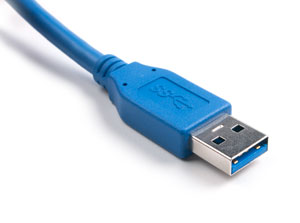
usb 3You’d have to know if USB 2.0 will be replaced by USB 3.0 started in 2010.

I also cannot wait to be there in Indonesia …. follows the explanation

USB 3.0 Specification:

Transfer Rate
USB 3.0 data transfer speeds of about 3200 Mbits/s (3.2 GBits/s or 400 Mbytes/s), and in theory can achieve 4.8 Gbit/s. This speed is 6 to 10 times faster than USB 2.0 maximum speed.

Data Transfer
USB 3.0 data transfer technology introduces two-way (full duplex), so it can read and write data simultaneously (simultaneously). USB 2.0 and earlier do not support this bi-directional technology.

Power
Electric voltage is derived from 4.4 V to 4V, then the flow also improved (to 150mA), so in addition to more energy efficient, a USB 3.0 port can be used 4-6 and increase the recharging device.

Power Management
Power management is better than USB 2.0, thus supporting the idle, sleep and suspend.

Physical Forms
Edge USB 3.0 will be the same as USB 2.0 (standard), but the cable therein will be more, there are an additional four USB 2.0 channels compared to cable (a total of nine cable channels).

Compatibility
USB 3.0 compatible with USB 2.0, so USB 2.0 devices will still be used in USB 3.0 port and will work with USB 2.0 standard speed. But not vice versa, a USB 3.0 device cannot be installed on a USB 2.0 port.

Operating System Support
Windows Vista, Windows 7 and Linux already support USB 3.0, and Mac will soon follow. But for Windows XP until now there is no certainty whether there will be an update to this new interface.

LACK of USB 3.0

Cable Length
Maximum length of a USB 3.0 cable will be reduced to 3 feet (USB 2.0 up to 5 meters). While this can be overcome by adding a USB Hub.

Speed Limit
Not all devices can use a USB 3.0 full speed, such as magnetic hard disk is limited to the speed of rotation of the disk copies.

{ 0 comments }

A little about CMD Command Prompt

The windows operating system user may be very familiar with the name CMD command prompt, which is a windows tool to run commands on windows OS in the text base, because there are times when the GUI version of the program is not as rich as a command line functions requires us to access the command prompt. There are also commands like-ping, netstat, and tracert which according to the network admin a lot more responsive than the application with a GUI format. As information “Prompt” it literally means Quick. There is also an opinion that it is better to master a command prompt so that the core server used to handle

Here below are the CMD Command Prompt:

[continue reading…]

{ 0 comments }

History of The First Computer Virus

First time computer viruses are created simultaneously with a computer. In 1949, one of the creators of computer, John von Newman, who created the Electronic Discrete Variable Automatic Computer (EDVAC), presented a paper entitled “Theory and Organization of Complicated Automata.” In his paper discussed the possibility of a program that can spread by it. Development of a computer virus subsequently occurred at AT & T Bell Laboratory, one computer laboratory in the world which has resulted in many things, such as language C and C + + . In this lab, circa 1960s, each time off the researchers to make a game with a program that can destroy the ability to fix itself and behind the opponent’s attacking position. In addition, the game program can reproduce itself automatically.

War of the program is called Core War, namely the winner is the owner of the program remains highest in a particular time interval. Well aware of the dangers of the program, especially if it is leaking out of the laboratory, each finished the game, the program has always been destroyed. Around the 1970s, Xerox introduced a program used to assist the smooth working. Program structure resembling a virus, but this program is to utilize as much time as possible and at the same time two tasks can be performed. In the 1980s, the war began with the virus in the world open up the exposure Fred Cohen, a researcher and assistant professor at the University of Cincinnati, Ohio. In his presentation, Fred also demonstrates a program of his creation, which is a virus that can spread quickly in a number of computers. While developing the virus, Indonesia has also started to hit the virus outbreak. This is the first computer virus to spread in Indonesia is also on 1988. Viruses are so appalling all computer users in Indonesia, then, are © Brain virus known as viral Pakistan.

Understanding Computer Viruses

The term computer virus is not foreign to the current computer user. In fact, about 12 years ago, this term has been recognized by the computer user community. New in 1988, articles appeared in mass media with the incessant preaching about a new threat for computer users who later became known as ‘computer virus’. Virus found on a computer is just a regular program, as appropriate on other programs. But there are very fundamental differences on computer viruses and other programs. Virus was made by someone with a variety of purposes, but generally only virus-makers want to pursue fame and also just for pleasure. But if someone makes a virus with the aim of damaging the course infected will confuse the computer.

Ability Basic Computer Virus

General definitions of computer virus is a computer program that is usually small size can cause disruption or damage to computer systems and have some basic skills, such as:

The ability to reproduce themselves
Namely the ability to make copies itself to files or disks that have not infected, so that over time have expanded their distribution area.

The ability to hide
Namely the ability to hide itself from the user’s attention, among other things the following ways:

  1. Facing the output to the screen for the virus worked, so the virus does not seem work by the user.
  2. Placed outside track2 virus program that created the DOS (e.g. track 41)
  3. The size of the virus was made as small as possible so as not to attract suspicion.

The ability to conduct manipulations
Actually not too important routine manipulation. But this is often distracting. Normally this routine is made for:

  1. Create a display or a disturbing message on the screen
  2. Replacing the diskette volume label
  3. Damaging the structure of the disk, delete files
  4. Disrupt the working tools of I/O, such as keyboards and printers

The ability to obtain information
Namely the ability to obtain information about the structure of storage media such as the location of the original boot record, partition table layout, layout FAT3, the position of a file, and so forth.

The ability to check his existence
Prior to infiltrate a file, the virus checks for himself in that file with the search for an ID (identification) himself in that file. Files that have not been infected with a virus must not contain the ID of the virus concerned. This ability to prevent the infiltration of many times on a same file.
{ 0 comments }

10 Advantages of Microsoft Office 2010

1. Save Documents
With Microsoft Office 2010, you can directly upload documents to the Windows Live SkyDrive account and access it from another computer. SkyDrive provides 25 GB of online storage for free, because these services are integrated with Office Web Apps. You can view and edit these documents anywhere in a web browser without requiring Microsoft Office (even on a Mac).

2. Insert a web video in your presentation
With Office 2010, you can easily add video clips from the Internet into your PowerPoint presentations as Flash video in regular web pages. The trick is easy, just copy the embed code from YouTube (or other video sharing site) and paste it anywhere on the slide.

3. Quick Steps in Outlook
Gmail includes a feature “Send and Archive” a multi-tasking. When you click this button, the first time will send a reply and then saved as archives with just one click. With the new feature “Quick Steps in Outlook”, you can use any Outlook items with a single click. In addition to “Send and Archive”, as another example is a quick step to “Send and Delete”, this feature will delete the email from your inbox after you reply your email.

4. Creating PDF files
All Office 2010 programs have a feature “built-in PDF writer” is to help you save a document to PDF format by simply clicking on the feature.

5. Print document
With Office 2010, Microsoft has changed the dialog box to print the document and it was a remarkable improvement. For example, you can set the printer (such as page margins, etc.) and see the changes per page

6. Slideshows in PowerPoint Broadcast
This is probably the favorite features of PowerPoint 2010. You can give a live presentation via the web in PowerPoint and anyone in the world can view your presentation using a web browser.

7. Editing Video in PowerPoint
Do you want to cut some parts of the video clips for use in your presentation? Or do you want such reflection combined with 3D rotation so that audiences stay glued to your presentation? Well, it’s easy because PowerPoint 2010 now, video editing features are also available

8. Slides as a video distribution
PowerPoint 2010 can turn your presentation into a video file formats that you can upload to YouTube or distribute on portable media players like iPods.

9. Built-in Screen Capture
All Office 2010 programs are now available screen clipping utility. This device will automatically take screenshots of all open applications on your desktop (not including applications minimized) and you can enter it directly into your documents or presentations.

10. Outlook gets social
when you open an email message in Outlook 2010, will display relevant information such as file attachments, pictures, meeting requests, and all previous email messages that may be exchanged with others (like Xobni).

There are two important things before you install Office 2010, namely:

  1. If you installed Office 2010 beta for the first time, the default settings will upgrade your Microsoft Office. But you can adjust these settings, and installed Office 2010, together with previous Office versions.
  2. If you already have a Technical Preview of Office 2010 on your computer, make sure you completely uninstall this issue before trying to install Office 14 beta. Usually you will find it hard to install Office therefore use the cleanup utility to remove all traces of previous versions of Office from your system.
{ 0 comments }

Tips on Holiday to Bidadari Island

Existence of Bidadari Island in a way quite unique among the group of Kepulauan Seribu. Besides presenting a coastal landscape, Bidadari Island is also a cultural heritage conservation area.

The trip to the nearby island of Jakarta Bay can be reached by using fast boats (speedboats), approximately 30 minutes. For the cost of this trip, you have to pay IDR 265.000 per person.

On top of your speedboat will get lunch, welcome drink, and accident insurance. In one day, there are at least two to three times of departure towards Bidadari Island from the Marina pier of Taman Impian Jaya Ancol . Here are some suggestions that you need to prepare when choosing Bidadari Island as the destination:

  • If you want to enjoy the sea journey via ship klotok, there is nothing wrong. The time that it takes about two hours and starts from Muara Angke.
  • Prepare a long-sleeved clothing and a hat to reduce the impact of the sun in coastal areas. Try to bring clothes that easily absorbs sweat.
  • At the Bidadari Island there are ordinary cottages and houses on stilts. In addition, there is also a kind of floating on the sea inn called the floating cottages. You just choose, the price offered vary from deluxe, family, and suite.
  • On normal days the price of lodging per night began IDR 475.000 to IDR 1.075.000. While for the weekend from IDR 865.000 until IDR 1.960.000 per day.
  • If you are sea food fans, Bidadari Island is the place. There was a main menu of seafood restaurant with raw materials acquired from fishermen in a fresh condition. Menu favorites like fish head soup, soup of blue swimmer crab, green mussels cooked butter, baby stingray, and others, is incomplete.
  • Do not forget to bring presents for the neighbors or close friends with a variety of marine products
{ 0 comments }

Ramadan 1431 h soon let us welcome with joy

Unnoticed, it seems only yesterday that we perform fasting for Ramadan. But in a minute less than two weeks away, we will carry out the obligations to the four pillars of Islam. Nothing less than the run of fasting in the month of ramadan in 1431 h / 2010.

As Muslims we should welcome him with joy. I’ve heard, whether the holy Al-Quran verses or hadith prophet. Whoever is happy with the coming month of Ramadan, Allah SWT will enter into the servants of his paradise. All would want it?

Ramadan Fasting 1431 h 2010 a challenging year

Why is full of challenges, not the other because the fasting of Ramadan in the year 2010 coincided with the uncertain weather. Most of Indonesia such as Depok and surrounding areas are still experiencing rain every day. But if the heat is not playing hot.

It is possible that when the month of Ramadan will occur a total hot weather. Of course this will really test our faith of the Muslims. But that is where lies the greater reward. The more severe the test the greater the reward that we will be. So keep up your spirit, it must be strong.

Download Schedule Imsakiyah Fasting Ramadan 1431 H / 2010 (Indonesia)

{ 0 comments }